Slack API Tier Limits and Burst Behavior
Slack's rate limits have invisible ceilings and burst thresholds that shift unpredictably.
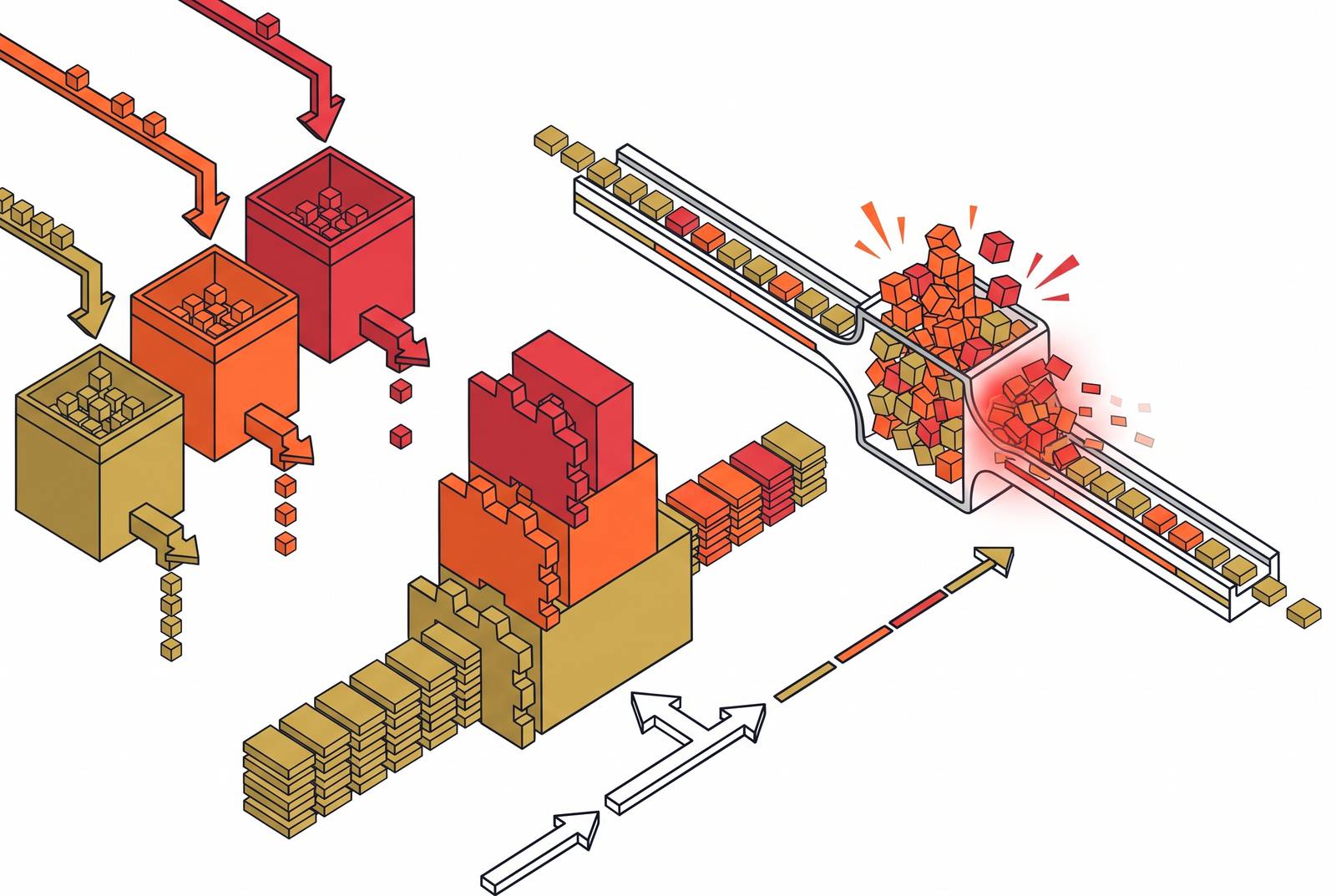
Slack's rate-limit system looks simple on the surface: four tiers, a clear minimum for each, and a predictable error when you cross the line. The gaps between what Slack publishes and what actually governs an integration's behavior are where production incidents happen.
What Slack's four published rate tiers mean, and what they leave out
Slack applies its Web API rate limits on a basis it describes as "per API method per workspace/team per app." A limit isn't a single global number but a separate budget for each combination of method, workspace, and app. Slack puts most Web API methods into one of four tiers. Tier 1 gets you at least 1 request per minute, Tier 2 at least 20, Tier 3 at least 50, and Tier 4 at least 100. There is also a Special Tier for methods like chat.postMessage, which don't fit the general pattern and so get their own rules.
Each tier number is a floor, not a ceiling. An app assigned to Tier 1 isn't necessarily capped at 1 request per minute; it's guaranteed no less than that, with unspecified headroom above it. Slack doesn't publish where that headroom ends. A developer who reads the tier table and treats it as a precise operating envelope has a false sense of certainty: the real limit sits somewhere above the published minimum, and how far above is never stated and can change.
Every plan, from free workspaces to the highest-tier offering, gets the same tier assignment for a given method. Paying more doesn't buy a higher rate limit. What does change the limit is app distribution status, a distinction that becomes central later in this piece: as of May 2025, apps that are commercially distributed but not approved for the Slack Marketplace receive lower limits on specific methods, including conversations.history and conversations.replies, than apps that are Marketplace-approved or built for internal use. The tier table by itself doesn't show this. You need to know which category your app falls into before the published numbers mean anything concrete.
How burst tolerance behaves in practice, and why it can't be relied upon
Slack wants any given API call to run at 1 request per second, but if you burst above that rate for a short window, it tolerates it. "Temporary" and "short" are the operative words: the tolerance exists to absorb momentary spikes, not to raise the sustained ceiling.
The tier documentation describes burst behavior in terms that get progressively looser as the tier number rises. Tier 1 tolerance is described as "a small amount" of burst behavior. Tier 2 allows "occasional bursts of more requests." Tier 3 permits "sporadic bursts." Tier 4 allows for "generous" bursts. None of these phrases comes attached to a number. Slack states outright that it does not share precise burst limits externally, and the reason given is deliberate: publishing a fixed burst ceiling would invite developers to build apps that depend on that exact number, and Slack wants the freedom to change burst behavior without breaking every integration built against today's undocumented value.
That design choice has a direct consequence for anyone building against the platform: burst tolerance behaves like a variable the system adjusts on its own terms, not a parameter an integration can plan around. If an app fires in tight bursts and happens to stay under today's invisible ceiling, that's not good engineering; it's been lucky so far. The ceiling can shift, and nothing in the published docs commits Slack to holding it steady.
Slack is explicit about why it reserves this latitude. The platform exists first as a communication tool for people, and Slack actively watches for, and throttles, apps that behave like spam, whether or not that behavior is intentional. If an integration posts in rapid bursts, it looks the same to Slack's systems whether it's a thoughtful notification tool or a runaway loop. The practical risk sits exactly where the stakes are highest: an integration that passes every light test in development can still accumulate 429 responses the moment real load arrives, during an incident storm with alerts firing across dozens of channels at once, which is precisely the moment those messages need to get through.
When a limit is crossed, Slack returns an HTTP 429 along with a Retry-After header that states the number of seconds to wait before trying that same method again, for that same workspace. Other methods, and the same method called against other workspaces, continue unaffected. That scoping detail turns out to matter a great deal once you look at what happens when a single integration is posting to many channels at once.
The per-channel message rule and the workspace-wide limit that compounds it
Message posting through chat.postMessage runs under the Special Tier, and you have to satisfy two constraints at the same time, not just one or the other. One is a per-channel limit of roughly 1 message per second. The other is a separate, workspace-wide message limit that sits on top of it. An integration has to satisfy both simultaneously, not pick whichever is more convenient.
You get short bursts above the per-channel rate, but if you sustain an overrun, it triggers throttling and returns a rate_limited error to the user, which differs from the ratelimited response that general Web API methods produce. Slack also warns that when a burst exceeds the available limit, some messages may simply not reach the channel, with an error shown to the user and no guarantee that the dropped message is stored or delivered later. That's a meaningfully different failure mode than a retryable 429: it's closer to silent data loss for a notification than a delay.
The compounding case that trips up integrations built and tested against a single channel is the fan-out scenario. So if an app posts alerts into, say, thirty channels at once, it can follow the 1-message-per-second rule on every channel and still exceed the workspace-wide cap the moment all thirty posts land in the same short window. Each channel, viewed in isolation, looks compliant. The workspace as a whole is not, because the aggregate-level constraint only fails when testing exercises more than one channel at a time, which single-channel testing never does.
Incoming webhooks sit under the same 1-request-per-second ceiling with the same short-burst tolerance as direct calls to chat.postMessage, so an integration built on webhooks inherits the identical dynamics. A related, narrower constraint applies to chat.scheduleMessage: scheduling too many messages into the same channel within a 5-minute window returns a restricted_too_many error, a hard cap distinct from the general messaging limits, and it matters for any integration that schedules messages ahead of time.
How the Events API inverts the rate-limit contract
Everything covered so far governs outbound calls, the requests you send to Slack. The Events API runs the relationship in the opposite direction, and the obligation it places on a developer looks nothing like a request budget. Slack has to get an HTTP 2xx response for every event it delivers to a subscribed app within 3 seconds, or it marks that delivery as failed.
A failed delivery gets retried, so one slow response won't sink you on its own. The real exposure is structural: if an app's failure rate stays high over a sustained period, roughly an hour, Slack disables that app's event subscriptions. That isn't a throttle or a slowdown; it's a full cutoff of inbound events until the subscription is restored. An integration that depends on Events API delivery to know when a message was posted or a reaction was added effectively goes blind.
The design requirement this creates is architectural, requiring more than tuning a retry loop. Acknowledgment and processing have to be separated: the endpoint needs to return its 2xx the moment it receives the event, and whatever real work the event triggers, posting a reply, updating a database, calling out to another service, needs to happen afterward, asynchronously. If an integration does its processing inline, inside the same handler that's supposed to acknowledge the event, it risks missing the 3-second window under load, and if it keeps missing it, the failure rate climbs toward the threshold that gets subscriptions disabled.
The 2025 restructuring that changed the economics of history-reading integrations
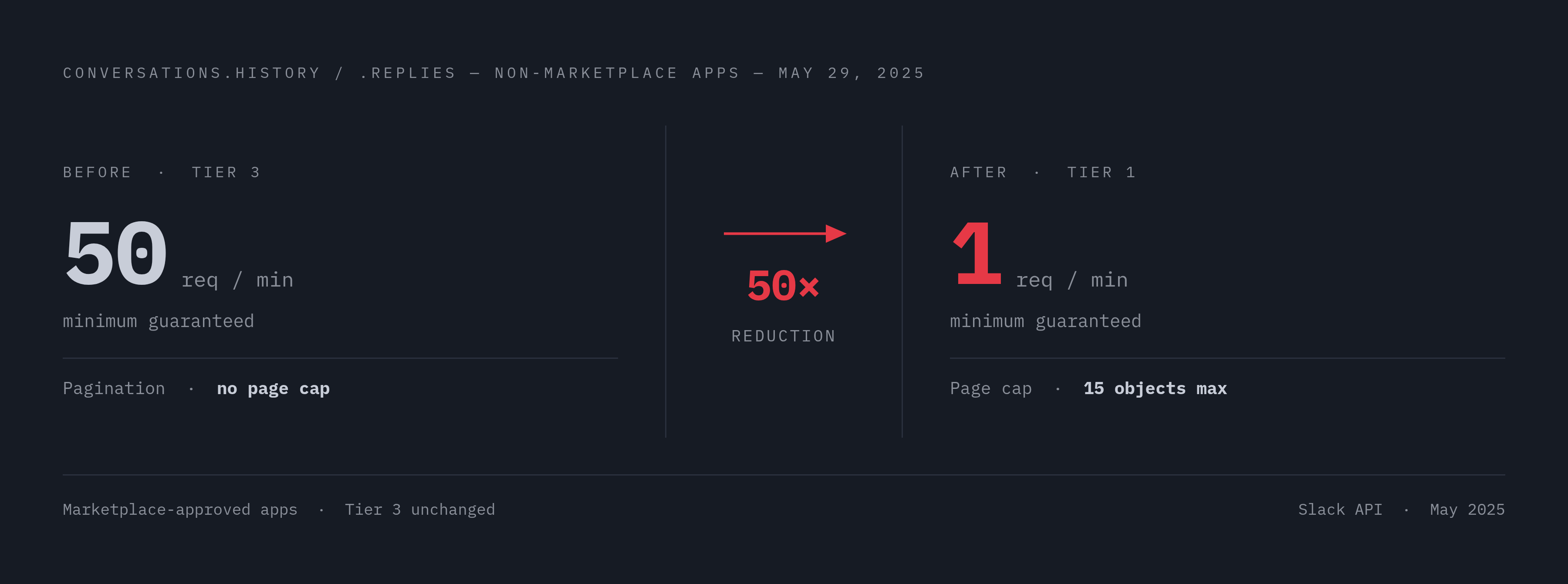
The most consequential change to this entire system in recent memory is a wholesale reclassification of two specific methods for a specific category of app. Effective May 29, 2025, conversations.history and conversations.replies were moved from Tier 3 down to Tier 1 for apps that are commercially distributed but not approved for the Slack Marketplace.
The distinctions in the scope of that change determine which apps are affected and which aren't. New non-Marketplace commercial apps became subject immediately, as of May 29, 2025, to 1 request per minute on those two methods, along with a hard cap of 15 objects per response (both the default page size and the maximum value of the limit parameter are fixed at 15). New installations of existing non-Marketplace apps fell under the same new limits on that same date. Existing installations of non-Marketplace apps get a longer runway: the posted limits take effect for them on March 3, 2026, and internal customer-built apps are excluded from the change. Apps approved for the Slack Marketplace keep Tier 3 access, at least 50 requests per minute, with the standard pagination limits intact.
The route around the new ceiling is Marketplace approval, and that route runs through a business and compliance process, not through a code change. An app that hasn't gone through that approval, for whatever reason, commercial, timeline, or otherwise, now operates conversations.history and conversations.replies at a limit roughly a thirtieth the size of Tier 3, with a page size that's a fraction of what Marketplace apps can pull in one call.
That shift lands hardest on a class of integration that's become increasingly common: LLM-powered agents that call conversations.history to pull recent channel messages into a context window before generating a response. An agent built against the old Tier 3 limits and now running as a non-Marketplace app faces a blunt choice at runtime. It either gets rate-limited into near silence on history calls, or it receives a context window truncated to 15 messages at a time, which for any active channel is a small fraction of the conversation. Either outcome degrades the quality of what the agent produces, and in the worst case, it responds with no meaningful channel context, indistinguishable from an agent that was never given access to history.
Why handling 429 correctly is necessary but not sufficient to keep an integration healthy
The 429 response itself is the one part of this system that's fully specified. Slack returns a Retry-After header with the exact number of seconds an integration should wait before calling that method again against that workspace. The contract is unambiguous, and violating it has a direct, measurable cost: retrying early produces another 429 and can extend the cooldown window. Getting this part right, honoring Retry-After exactly, and applying exponential backoff with jitter for other transient errors, is table stakes. No integration posting into Slack at any meaningful volume should skip it.
But getting retry handling right solves only half the problem, and it's the easier half. Correct backoff prevents a rate-limit event from cascading into a longer outage, but stopping the burst from happening in the first place requires something else. An integration can honor every Retry-After header perfectly, and it can still generate the burst that triggers the 429, still exceed the workspace-wide message cap during a fan-out, and still miss the Events API's 3-second acknowledgment window under load. Retry logic is a response to a problem that's already occurred. Preventing the problem is a separate, architectural task.
The structural fix is a queue sitting between event ingestion and outbound posting. When events arrive faster than the rate at which Slack will accept outbound calls, that queue absorbs the difference, so a spike on the inbound side doesn't translate directly into a spike of outbound API calls. A handful of message-level strategies cut the number of calls you make before the rate limit even comes into play. Batching combines related events from a short window into one consolidated message. Deduplication posts once for a repeated signal and updates a count. Using chat.update to edit an existing message is cheaper against the rate limit than streaming out a new post for every change. Spreading posts across many channels over time, rather than firing them all in a tight loop, keeps the workspace-wide budget from being hit all at once. None of these replace correct retry handling; they just cut how often that retry logic ever has to fire.
Why testing against live Slack is the wrong place to discover these failure modes
Every failure mode described above shares a common property: it is only visible under sustained, stateful load. Burst-threshold behavior, the sustained failure rate that gets an app's event subscriptions disabled, the gap between per-channel compliance and workspace-wide breach, the behavior of the new Tier 1 ceiling on conversations.history, none of these appear in a quick manual test that sends a handful of requests and checks that the response looks right. They need a long enough sequence of calls, under conditions close to production load, to become visible, which makes them structurally easy to miss until an incident reveals them.
Testing directly against the live Slack API has its own costs that make it a poor place to go looking for these problems. Every test call you make spends real rate budget out of the workspace you run it against. The live API won't reliably produce a controlled 429 or a sustained failure sequence on command just because a test wants to observe one, and there's no way to use it to see what actually happens once an integration exhausts the Events API's delivery ceiling, short of actually getting an app's subscriptions disabled.
Stateless mocks don't fill that gap either. A mock that returns the same hardcoded response to every matching request has no memory of how many calls have already been made, what budget remains, or what a realistic sequence, a 429 followed by a wait followed by a successful retry, actually looks like across repeated calls. Without that memory, there's no way to confirm that an integration's retry-and-queue logic behaves correctly, because the mock can't produce the conditions that logic is meant to handle.
What actually closes the gap is a simulator that holds state: one that tracks call counts per method and per workspace, returns a 429 with the correct Retry-After header once the right threshold is crossed, enforces the per-channel message rule alongside the workspace-wide cap, mirrors the Events API's delivery ceiling, and applies the Tier 1 versus Tier 3 distinction on conversations.history depending on whether the simulated app is treated as Marketplace-approved or not. If you have that kind of state tracking in place, you can trigger every failure mode covered here on demand, run it repeatedly, and check it in continuous integration without touching a live workspace or spending real rate budget. Fault injection, deliberately forcing a rate-limit response, simulating a sustained run of Events API failures, adding latency into the chain, belongs in that testing process as a basic requirement, not an extra step tacked on afterward. The integrations that fail in production are, overwhelmingly, the ones that never tested the behavior they ended up meeting under real load.